What Photogrammetry Is
Photogrammetry recovers 3D geometry from a set of 2D photographs taken from different positions. If a feature appears in two or more photos, software can triangulate its 3D position by computing where the lines of sight from each camera intersect. Do this for thousands of feature points and you get a 3D point cloud, which can be meshed into a textured surface.
For this to work, the software needs enough common features across photos to find the matches. That is what "overlap" means: each photo must share enough of its content with adjacent photos that the software can identify the same physical points appearing in multiple frames.
Overlap Targets
Industry standards developed over decades of aerial photogrammetry:
-
80% forward overlap. Between consecutive frames along the direction of travel.
-
60% side overlap. Between adjacent parallel strips when covering an area.
-
70–80% angular overlap. Between adjacent frames when orbiting a single object.
These numbers exist because photogrammetry software is conservative. Less overlap risks gaps in the reconstruction; more overlap costs you battery, storage, and processing time without adding much accuracy.
The Baseline
The baseline B is the physical distance between successive shutter clicks required to hit a target overlap O on a frame of width W:
B = W × (1 − O)
Where:
-
B = baseline (the distance you move between shots)
-
W = frame width measured on the subject (real-world units, like meters — not pixels)
-
O = required overlap as a decimal (0.80 for 80%)
Worked Example: Strip Capture
Your underwater camera, with a 30° air half-FOV held 1.5 m from the subject, produces a frame on the subject that is about 1.2 m wide (computed by exact geometry from the underwater FOV; see Module 3). You want 80% overlap:
B = 1.2 × (1 − 0.80) = 0.24 m
You move 24 cm between shots. That is closer than it sounds — less than a foot. Photogrammetry is a high-shot-density discipline.
Try it online: the Baseline & Shutter calculator in the Tools section at reefcartographer.com
Worked Example: Convergent Orbit
For Dive 2 you will orbit a target object. The linear baseline formula approximates angular spacing for small turns. If you orbit at radius r, the angular spacing between shots is:
Δφ = B / r
With r = 2 m and B = 0.24 m:
Δφ = 0.24 / 2 = 0.12 rad ≈ 6.9°
A full 360° orbit requires 360 / 6.9 ≈ 52 frames. Add 5–10% safety margin to close the loop, so plan for 55–60 frames per orbit.
Try it online: the Orbit Frame Count calculator in the Tools section at reefcartographer.com
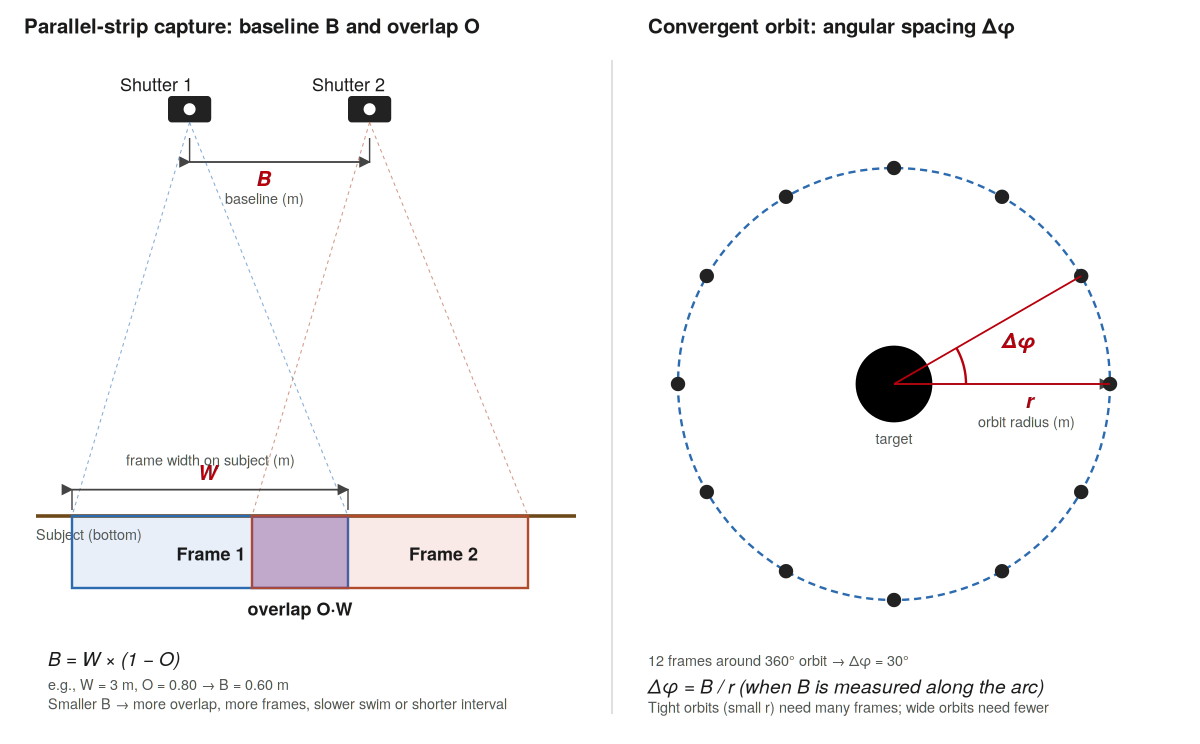
Figure 6. Photogrammetry geometry. Left: parallel-strip capture, showing frame width W on the subject, baseline B between successive shutter clicks, and overlap fraction O. Right: convergent orbit at radius r with angular spacing Δφ between frames.
Converting Baseline to Shutter Interval
Most cameras let you set a time-lapse / intervalometer mode that takes a photo every N seconds. To translate your baseline into a shutter interval, divide by your swimming speed v:
t = B / v
Typical underwater speed under task load is 0.3–0.5 m/s. With B = 0.24 m and v = 0.4 m/s:
t = 0.24 / 0.4 = 0.6 s
Set the camera to one shot per second to give yourself a small margin. More overlap than required is fine; less is not.
Self-Check
1. Your camera produces an underwater frame width of 0.8 m on the subject. What baseline do you need for 80% overlap?
2. If you swim at 0.3 m/s, what shutter interval does that baseline correspond to?
3. You plan an orbit around a target at radius 3 m with a baseline of 0.2 m. How many frames per full orbit, with a 10% safety margin?
Answers
1. B = 0.8 × 0.20 = 0.16 m.
2. t = 0.16 / 0.3 ≈ 0.53 s. Set the camera to a 1-second interval.
3. Δφ = 0.2 / 3 ≈ 0.067 rad ≈ 3.8°. Base count = 360 / 3.8 ≈ 95 frames. With 10% margin, plan ~105 frames per orbit.